
Flink实时TopN分析与实战

前言
在数据开发中,经常会收到来自业务部门指标需求。需要我们实时的对上游产生的行为数据或者日志进行分析聚合,根据预先定义好的时间段进行统计。最后输出到数据库中,供展示使用。即我们常说的实时TopN。
定义
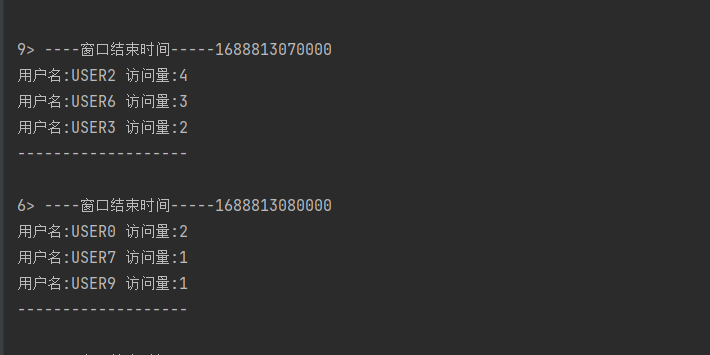
实时TopN是指在一个数据流中,实时地计算并返回当前时间窗口内某个指标的前N个最大值或最小值。在实现过程中,需要考虑数据的去重、排序、分组等问题,同时还需要考虑如何优化计算性能,以提高实时性和可伸缩性。
模拟数据
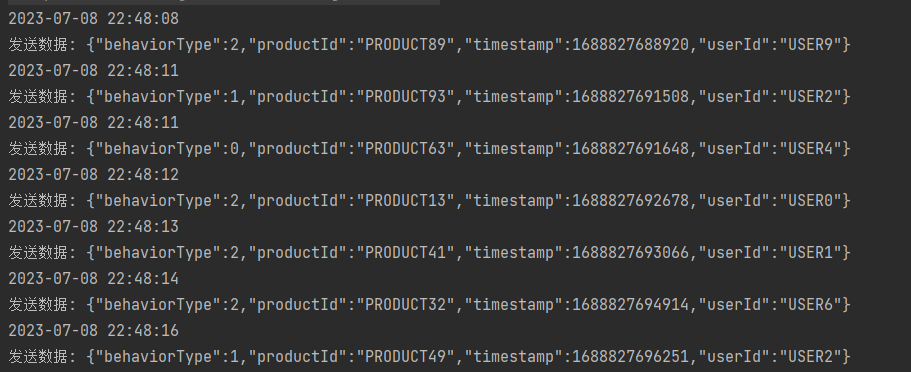
首先写一段代码来模拟用户不同时间段的行为数据。通过新建一个线程来生成随机的用户数据,然后每隔固定的时间段发送到Kafka。其中KafkaUtil是用于发送的数据封装的工具类。
1 | package com.hc; |
实现思路与步骤
定义KafkaSource。
1
2
3
4
5
DataStreamSource<String> dataStreamSource = env.addSource(new FlinkKafkaConsumer<>(
"test", //kafka topic
new SimpleStringSchema(), // String 序列化
props).setStartFromLatest()
).setParallelism(1);抽取事件时间的时间戳,指定水位线的生产方式。
1
2
3
4
5
6
7
8
9
10
11
12
13
SingleOutputStreamOperator<UserBehaviorData> userBehaviorDs = dataStreamSource.flatMap(new FlatMapFunction<String, UserBehaviorData>() {
public void flatMap(String s, Collector<UserBehaviorData> collector) throws Exception {
collector.collect(JSON.parseObject(s, UserBehaviorData.class));
}
})
.assignTimestampsAndWatermarks(WatermarkStrategy.<UserBehaviorData>forBoundedOutOfOrderness(Duration.ofSeconds(1))
.withTimestampAssigner(new SerializableTimestampAssigner<UserBehaviorData>() {
public long extractTimestamp(UserBehaviorData userBehaviorData, long l) {
return userBehaviorData.getTimestamp();
}
}));根据用户Id分组,按照需求进行开窗(每5秒计算过去10秒窗口的数据)。通过keyBy用户进行分组,使用SlidingEventTimeWindows.of(Time.second,Time.second)开窗然后进行聚合累计访问的值。使用aggregate(AggregateFunction , WindowFunction 增量的聚合操作,减少存储压力,提高效率。
1
2
3
4
5
6
7userBehaviorDs.keyBy(new KeySelector<UserBehaviorData, String>() {
public String getKey(UserBehaviorData userBehaviorData) throws Exception {
return userBehaviorData.getUserId();
}
}).window(TumblingEventTimeWindows.of(Time.seconds(10)))
.aggregate(new CountAgg(), new WindowResultFunction());根据窗口windowEnd分组,定义处理函数结合状态编程计算TopN的数据。状态可以使用Flink管理的ListState,通过定时器触发计算。取countTOPN 可以直接对List进行排序,或者使用PriorityQueue。具体如下:
1
2
3
4
5
6
7
8
9
10
11
12
13
14
15
16
17
18
19
20
21
22
23
24
25
26
27
28
29
30
31
32
33
34
35
36
37
38
39
40
41
42
43
44
45
46
47
48
49
50
51
52
53
54
55
56
57
58
59
60
61
62
63
64
65
66
67
68
69
70
71
72
73
74
75
76
package com.hc.process;
import com.hc.model.UserViewCount;
import org.apache.flink.api.common.state.ListState;
import org.apache.flink.api.common.state.ListStateDescriptor;
import org.apache.flink.configuration.Configuration;
import org.apache.flink.streaming.api.functions.KeyedProcessFunction;
import org.apache.flink.util.Collector;
import java.util.Comparator;
import java.util.List;
import java.util.PriorityQueue;
import java.util.stream.Collectors;
/**
* @Author HaosionChiang
* @Date 2023/7/8
**/
public class TopNKeyedProcessFunction extends KeyedProcessFunction<Long, UserViewCount, String> {
private int n;
private ListState<UserViewCount> state;
public TopNKeyedProcessFunction(int n) {
this.n = n;
}
public void open(Configuration parameters) throws Exception {
super.open(parameters);
ListStateDescriptor<UserViewCount> userViewCountListStateDescriptor = new ListStateDescriptor<>(
"state",
UserViewCount.class
);
state = getRuntimeContext().getListState(userViewCountListStateDescriptor);
}
public void processElement(UserViewCount userViewCount, KeyedProcessFunction<Long, UserViewCount, String>.Context context, Collector<String> collector) throws Exception {
//每来一条数据, 将其加入状态
//然后注册一个定时器,当前窗口的结束时间+1触发
state.add(userViewCount);
context.timerService().registerEventTimeTimer(context.getCurrentKey()+1);
}
public void onTimer(long timestamp, KeyedProcessFunction<Long, UserViewCount, String>.OnTimerContext ctx, Collector<String> out) throws Exception {
super.onTimer(timestamp, ctx, out);
PriorityQueue<UserViewCount> queue = new PriorityQueue<>(new Comparator<UserViewCount>() {
public int compare(UserViewCount o1, UserViewCount o2) {
return (int) (o2.getViewCount() - o1.getViewCount());
}
});
//排序
for (UserViewCount userViewCount : state.get()) {
queue.add(userViewCount);
}
//封装输出
StringBuilder sb = new StringBuilder();
sb.append("----窗口结束时间-----").append(ctx.getCurrentKey()).append("\n");
for (int i = 0; i < n; i++) {
if (!queue.isEmpty()){
UserViewCount peek = queue.peek();
sb.append("用户名:").append(peek.getUserName()).append("\t").append("访问量:").append(peek.getViewCount()).append("\n");
queue.poll();
}
}
sb.append("-------------------\n");
out.collect(sb.toString());
}
}主函数
1
2
3
4
5
6
7
8
9
10
11
12
13
14
15
16
17
18
19
20
21
22
23
24
25
26
27
28
29
30
31
32
33
34
35
36
37
38
39
40
41
42
43
44
45
46
47
48
49
50
51
52
53
54
55
56
57
58
59
60
61
62
63
64
65
66
67
68
69
package com.hc;
import com.alibaba.fastjson2.JSON;
import com.hc.model.UserBehaviorData;
import com.hc.model.UserViewCount;
import com.hc.process.CountAgg;
import com.hc.process.TopNKeyedProcessFunction;
import com.hc.process.WindowResultFunction;
import org.apache.flink.api.common.eventtime.SerializableTimestampAssigner;
import org.apache.flink.api.common.eventtime.WatermarkStrategy;
import org.apache.flink.api.common.functions.FlatMapFunction;
import org.apache.flink.api.common.serialization.SimpleStringSchema;
import org.apache.flink.api.java.functions.KeySelector;
import org.apache.flink.streaming.api.datastream.DataStreamSource;
import org.apache.flink.streaming.api.datastream.SingleOutputStreamOperator;
import org.apache.flink.streaming.api.environment.StreamExecutionEnvironment;
import org.apache.flink.streaming.api.windowing.assigners.TumblingEventTimeWindows;
import org.apache.flink.streaming.api.windowing.time.Time;
import org.apache.flink.streaming.connectors.kafka.FlinkKafkaConsumer;
import org.apache.flink.util.Collector;
import java.time.Duration;
import java.util.Properties;
/**
* @Author HaosionChiang
* @Date 2023/7/7
**/
public class TopNJob {
public static void main(String[] args) throws Exception {
StreamExecutionEnvironment env = StreamExecutionEnvironment.getExecutionEnvironment();
DataStreamSource<String> dataStreamSource = env.addSource(new FlinkKafkaConsumer<>(
"test", //kafka topic
new SimpleStringSchema(), // String 序列化
PropertiesUtil.getprops()).setStartFromLatest()
).setParallelism(1);
SingleOutputStreamOperator<UserBehaviorData> userBehaviorDs = dataStreamSource.flatMap(new FlatMapFunction<String, UserBehaviorData>() {
public void flatMap(String s, Collector<UserBehaviorData> collector) throws Exception {
collector.collect(JSON.parseObject(s, UserBehaviorData.class));
}
})
.assignTimestampsAndWatermarks(WatermarkStrategy.<UserBehaviorData>forBoundedOutOfOrderness(Duration.ofSeconds(1))
.withTimestampAssigner(new SerializableTimestampAssigner<UserBehaviorData>() {
public long extractTimestamp(UserBehaviorData userBehaviorData, long l) {
return userBehaviorData.getTimestamp();
}
}));
//增量聚合
//agg统计窗口中的条数,即遇到一条数据就加一。
//将每个key窗口聚合后的结果带上其他信息进行输出。
SingleOutputStreamOperator<UserViewCount> aggregateDs = userBehaviorDs.keyBy(new KeySelector<UserBehaviorData, String>() {
public String getKey(UserBehaviorData userBehaviorData) throws Exception {
return userBehaviorData.getUserId();
}
}).window(SlidingEventTimeWindows.of(Time.seconds(10),Time.seconds(5)))
.aggregate(new CountAgg(), new WindowResultFunction());
//按照窗口统计后的数据, 排序和输出
aggregateDs.keyBy(UserViewCount::getWindowEnd)
.process(new TopNKeyedProcessFunction(3)).print();
env.execute();
}
实现结果
- 数据模拟
- TopN访问
All articles in this blog are licensed under CC BY-NC-SA 4.0 unless stating additionally.
Related Articles




Comment